TypoCraft
Same content, three completely different reading experiences
Interactive Markdown editorial experience that transforms the same content through three visually distinct typographic systems.
1. Summary
TypoCraft is an interactive editorial experience that allows users to write Markdown and preview it in real time through three different typographic systems: Manuscript, Modernist, and Deep Night.
The content remains unchanged while its visual presentation changes completely. Each system combines different typography, colors, spacing, composition, and decorative elements to demonstrate how design decisions can transform the reading experience without modifying the underlying content.
Built with Astro, React, TypeScript, and Tailwind CSS, the project runs entirely in the browser and is deployed as a static application through GitHub Pages.
| 3 | 4 | 1 | ~560 |
|---|---|---|---|
| visual systems | React components | main page | TSX lines |
2. Objective
TypoCraft was developed as a technical and visual exploration of the relationship between content, typography, and interface design.
The technical objective was to build an application capable of:
- Editing Markdown directly in the browser.
- Rendering content in real time.
- Preserving the same content while switching themes.
- Applying radically different visual systems through CSS.
- Maintaining a lightweight static frontend architecture.
- Adapting the experience to desktop and mobile devices.
The project is not intended to be a CMS or SaaS platform. Its primary purpose is to demonstrate frontend development, editorial composition, theming, and interaction design.
3. Solution
The application uses a split interface with two main areas:
- Editor: allows users to enter Markdown and displays content statistics.
- Preview: immediately converts the Markdown into HTML and applies the selected visual system.
Users can switch between three experiences:
Manuscript
A system inspired by classical editorial publications, using serif typography, parchment-like backgrounds, drop caps, and ornamental elements.
Modernist
A contemporary editorial composition based on a floating A4 page, sans-serif typography, and minimal visual hierarchy.
Deep Night
A dark interface inspired by development tools, featuring a simulated browser window and a code-editor aesthetic.
Processing Flow
User Markdown
      ↓
React State
      ↓
marked
      ↓
Generated HTML
      ↓
Selected Theme
      ↓
Typographic Preview
All processing occurs locally in the browser.
4. Architecture
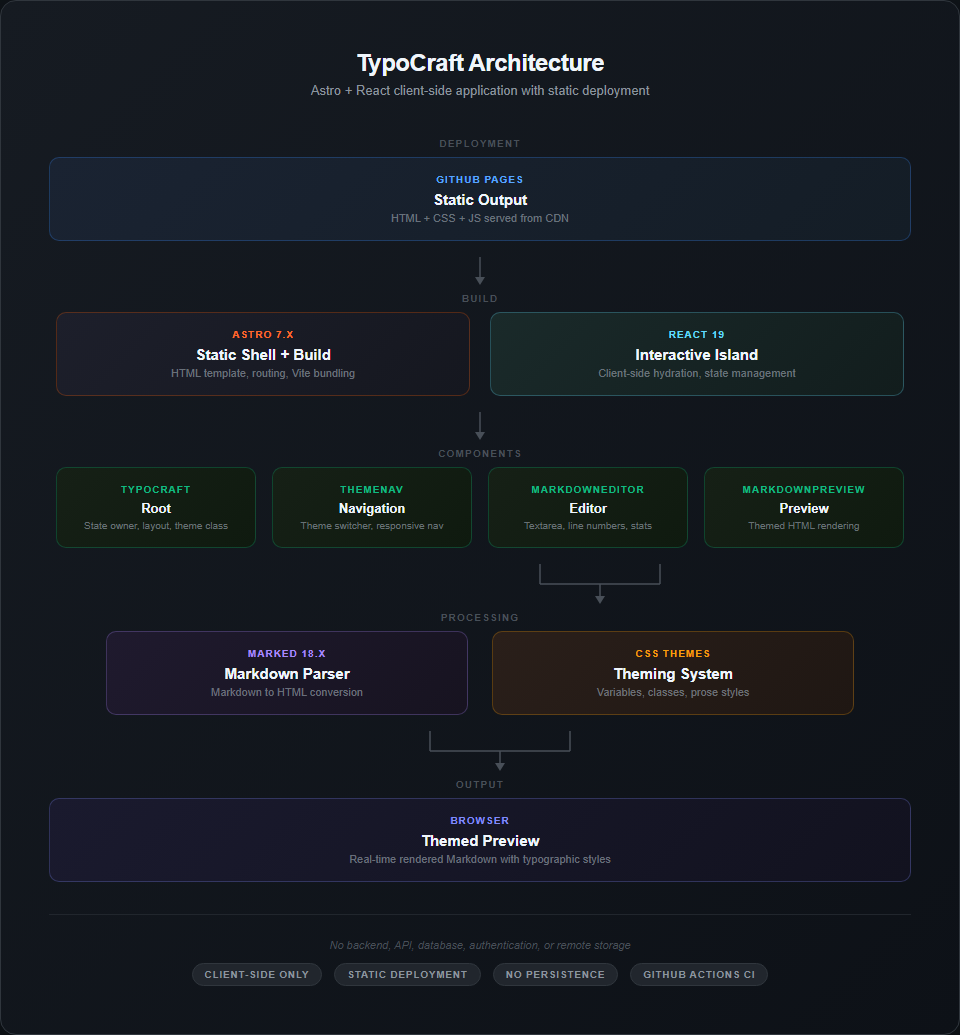
Architecture diagram: GitHub Pages, Astro, React, components, marked, CSS systems, and browser.
TypoCraft uses a frontend-only architecture without a backend:
- Astro generates the static application shell.
- React manages application state and interaction.
- marked converts Markdown into HTML.
- CSS and Tailwind provide the visual systems.
- GitHub Pages serves the generated application.
There is no API, database, authentication layer, or remote storage.
This architecture keeps the project lightweight and appropriate for a static interactive experience.
5. Technology Stack
| Technology | Purpose |
|---|---|
| Astro 7.x | Static shell, routing, and generation |
| React 19 | Interactivity and state management |
| TypeScript 5.7 | Static typing |
| Tailwind CSS 4.x | Styling and responsive design |
| marked 18.x | Markdown processing |
| Vite | Build tooling |
| pnpm | Package management |
| GitHub Actions | Deployment automation |
| GitHub Pages | Static hosting |
Typography
- Epilogue
- Inter
- JetBrains Mono
- Crimson Pro
- Material Symbols
6. Features
- Real-time Markdown editor and preview.
- Three visual systems: Manuscript, Modernist, and Deep Night.
- Theme switching without losing content.
- Dynamic line numbering.
- Character counter.
- Line counter.
- Theme-specific Markdown rendering.
- Custom scrollbars.
- Drop caps and ornamentation in Manuscript.
- Floating A4 composition in Modernist.
- Simulated browser window in Deep Night.
- Real-time rendering indicator.
- Responsive layout.
- Desktop and mobile navigation.
- Automated deployment through GitHub Actions.
7. Key Technical Decisions
Astro + React
Astro provides the static application shell while React is used for the interactive experience.
Advantage: keeps delivery static and concentrates JavaScript where interaction is required.
Trade-off: most of the interactive experience currently resides inside a single React island, so the project does not fully leverage Astro’s islands architecture.
marked
marked is used to transform Markdown into HTML during editing.
Advantage: straightforward API and direct client-side processing.
Trade-off: generated HTML requires sanitization if the content is eventually stored, shared, or published.
CSS-based Theming
Visual systems are implemented through CSS classes and variables.
Advantage: allows substantial visual changes without modifying the content or core processing flow.
Trade-off: adding a new visual system currently requires changes across components and associated styles.
No Persistence
Content exists only in application state.
Advantage: keeps the architecture simple and free from external storage dependencies.
Trade-off: content is lost when the page is refreshed.
8. Security and Quality
Security
The application has no backend and does not transmit user-entered content.
The preview uses dangerouslySetInnerHTML to insert HTML generated by marked. In the current architecture, content remains local and there is no persistence or remote content exchange.
If storage, publishing, or document sharing were introduced, HTML sanitization would be required before rendering untrusted content.
Current Quality Controls
Currently there are no:
- Unit tests.
- Integration tests.
- E2E tests.
- Automated coverage.
- Automated linting.
GitHub Actions currently automates the build and deployment process.
These capabilities are part of the technical evolution of the project and are not currently implemented features.
9. User Experience
The interface uses almost the entire viewport and is organized around two primary elements:
- Markdown editor.
- Real-time preview.
Desktop
The editor and preview are displayed side by side.
Mobile
The panels switch to a vertically stacked composition and theme controls adapt to the available space.
Interaction
Every Markdown modification immediately updates the preview.
Theme changes happen instantly while preserving the current content.
The central UX concept is that users can experiment with different visual decisions without changing the content they are writing.
10. Visual Evidence
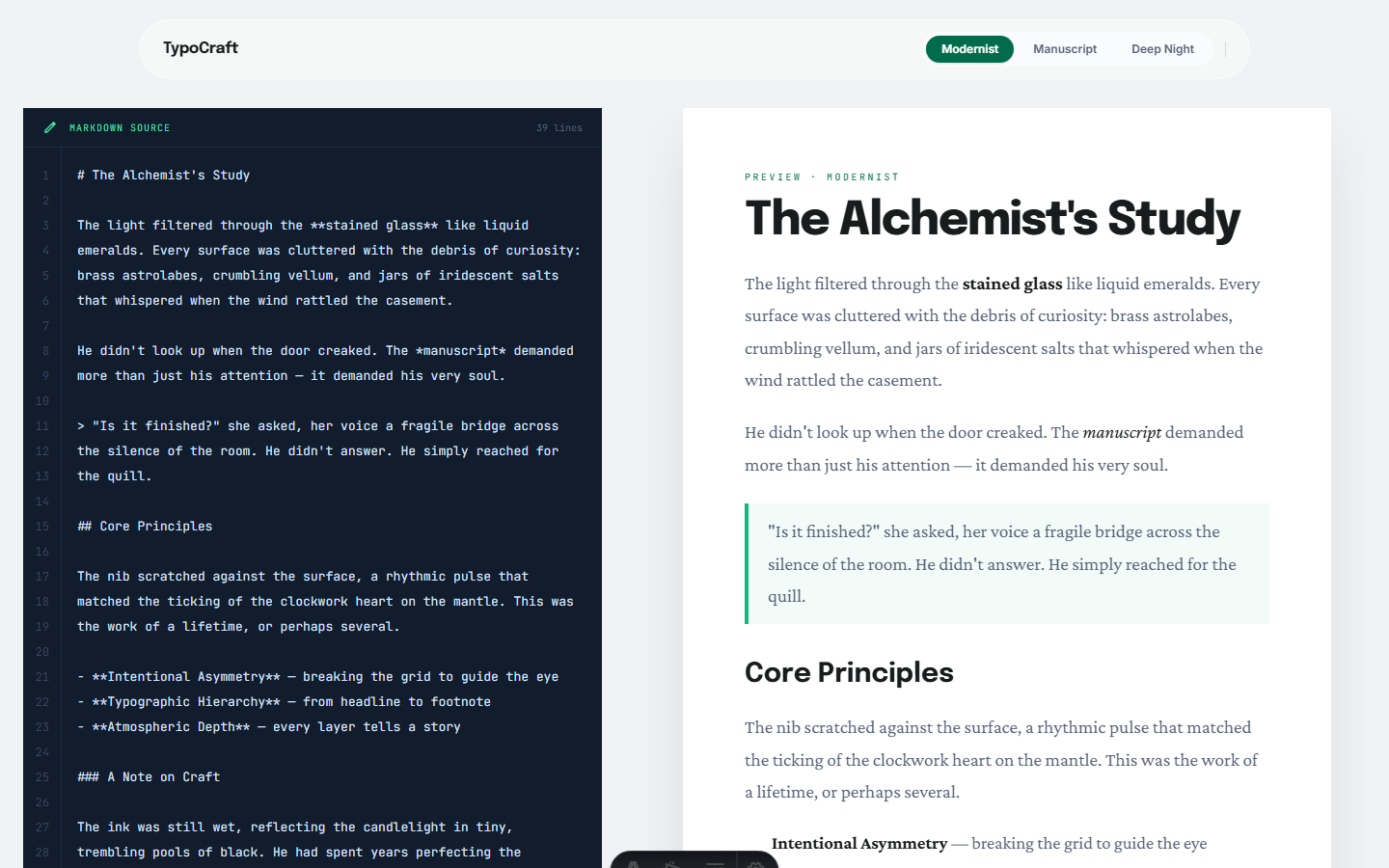
Full view of the Modernist system: Markdown editor on the left and floating A4 composition on the right.
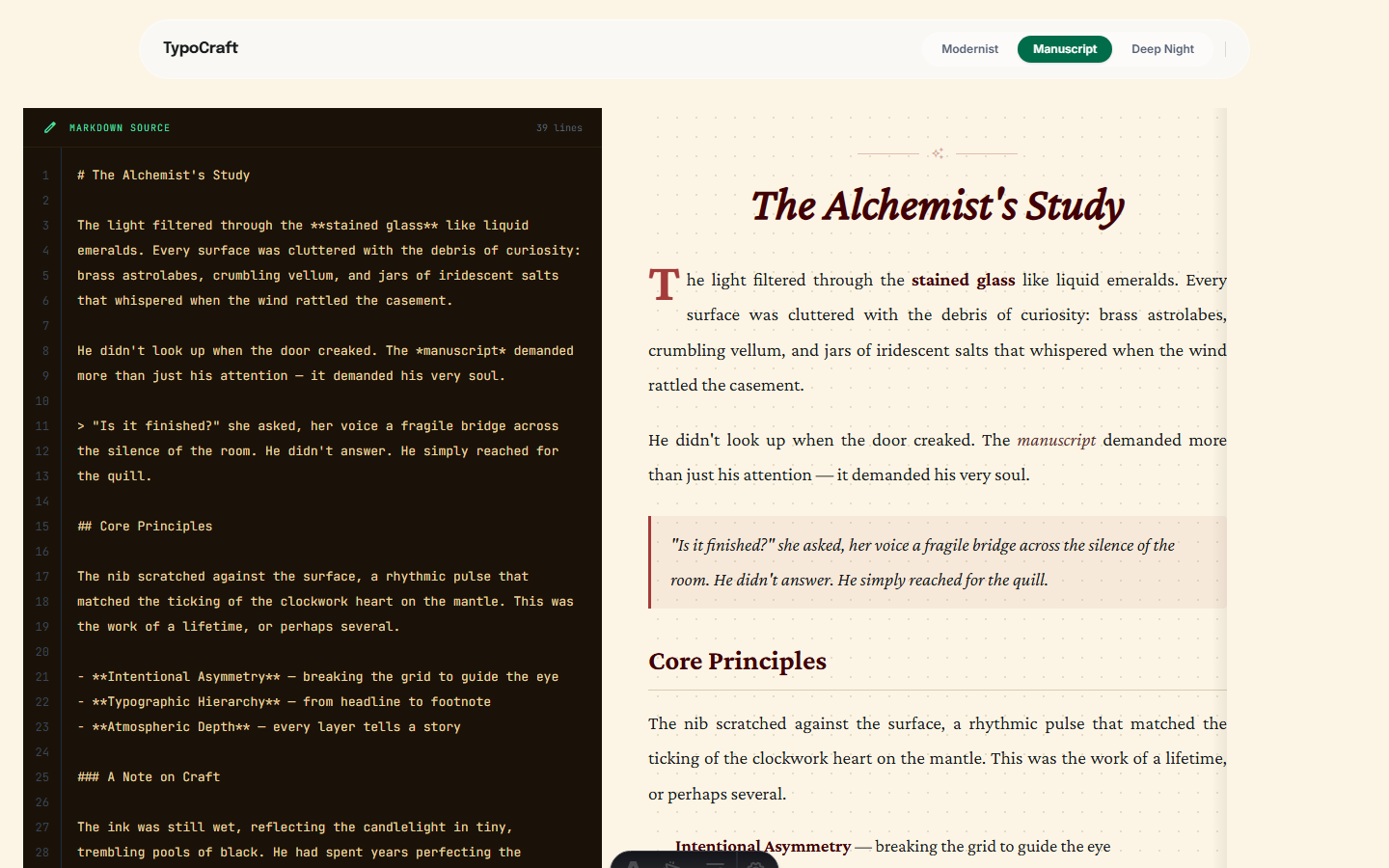
Manuscript system showing serif typography, parchment-like background, decorative drop cap, and ornamental elements.
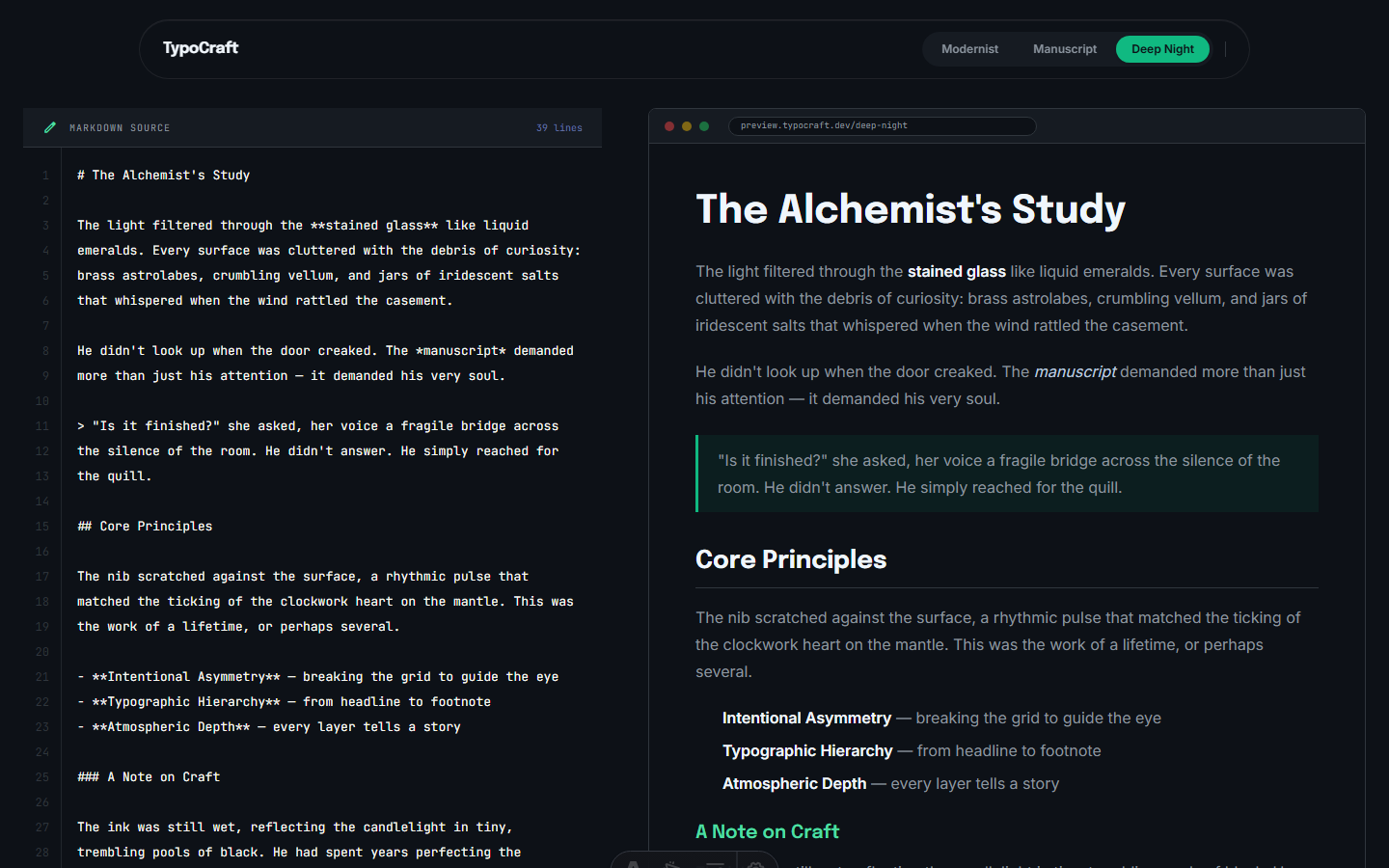
Deep Night system with code-editor aesthetics, simulated browser window, and dark composition.
11. Current Status
Classification: Demo / Proof of Concept
TypoCraft currently demonstrates:
- Frontend development with Astro and React.
- Visual system design.
- Real-time Markdown processing.
- Editorial and typographic design.
- Responsive design.
- React integration through Astro Islands.
- Automated build and deployment.
It is not presented as a production-ready Markdown editor because it currently lacks persistence, export functionality, collaboration, and an automated testing suite.
12. Limitations and Evolution
Current Limitations
- Content is lost on refresh.
- No Markdown, HTML, or PDF export.
- No syntax highlighting.
- No collaboration.
- No automated tests.
- No independent linting step in CI.
- Some dependencies require review.
- New themes require manual implementation.
- Generated HTML is not sanitized.
- Some visual configuration is duplicated between React and CSS.
Proposed Evolution
- Add local persistence using
localStorageor IndexedDB. - Add Markdown, HTML, and PDF export.
- Add syntax highlighting.
- Make editor and preview panes resizable.
- Add in-document search.
- Move themes toward a more declarative configuration.
- Add automated tests.
- Add HTML sanitization.
- Review and remove unnecessary dependencies.
- Add automated vulnerability analysis to the pipeline.
Evolution should prioritize improving existing capabilities before introducing additional technologies.
13. What This Project Demonstrates
TypoCraft demonstrates practical experience with:
- Astro + React frontend architecture.
- React state management.
- Astro Islands.
- Responsive interface design.
- CSS-based visual systems.
- Theming through variables and classes.
- Real-time Markdown processing.
- Typography and editorial composition.
- Reusable interface components.
- GitHub Actions automation.
- Static deployment through GitHub Pages.
- Separation between content, processing logic, and visual presentation.