LyricFlow
Multimedia player with synchronized lyrics and audio visualization
Web music player with real-time synchronized lyrics, Canvas and Web Audio API visualization, multiple visual themes, and a CLI pipeline for content preparation.
1. Summary
LyricFlow is a web music player designed around an immersive visual listening experience. It synchronizes lyrics with audio in real time, generates visualizations using Web Audio API and Canvas, provides multiple visual themes, and supports multiple lyric tracks including translations.
The application is designed primarily as a static frontend and does not require a backend for playback. Music content and metadata are prepared through a CLI pipeline that imports songs, processes LRC files, and retrieves synchronized lyrics from LRCLIB.
The project focuses on multimedia frontend development, real-time synchronization, browser-based audio processing, and creative coding.
2. Context and Objective
Music players commonly separate audio playback from visual presentation. LyricFlow explores how playback, synchronized lyrics, audio visualization, and visual customization can be combined into a single interface.
The main objectives were:
- Synchronize lyrics with the current audio position.
- Analyze audio directly in the browser.
- Generate visualizations using Canvas.
- Maintain a modular frontend architecture.
- Separate content preparation from playback.
- Avoid requiring a backend for the core experience.
3. Solution
LyricFlow combines two main parts:
Web Player
- MP3 playback.
- Real-time lyric synchronization.
- Binary search over the cue timeline.
- Audio visualization using
AnalyserNode. - Three visualization modes: bars, wave, and mirror.
- Visual theme system.
- Per-song image, video, or color backgrounds.
- JSON-based playlist.
- Original lyrics and translation support.
CLI Pipeline
Content is prepared before deployment through independent commands:
songs:importsongs:import-lrcsongs:fetch-lyricssongs:generatecheck-missing-timelinesinject-background
The pipeline can process local content and optionally query LRCLIB when synchronized lyrics are required.
Content Flow
Audio + Metadata
      ↓
CLI Pipeline
      ↓
LRCLIB (optional)
      ↓
public/songs/<slug>/
      ├── audio.mp3
      ├── song.json
      └── background.* (optional)
      ↓
Next.js / React
      ↓
Audio Element
      ├── Web Audio API
      ├── Canvas Visualizer
      └── Lyrics Engine
4. Architecture
The application uses a modular frontend architecture based on Next.js and React.
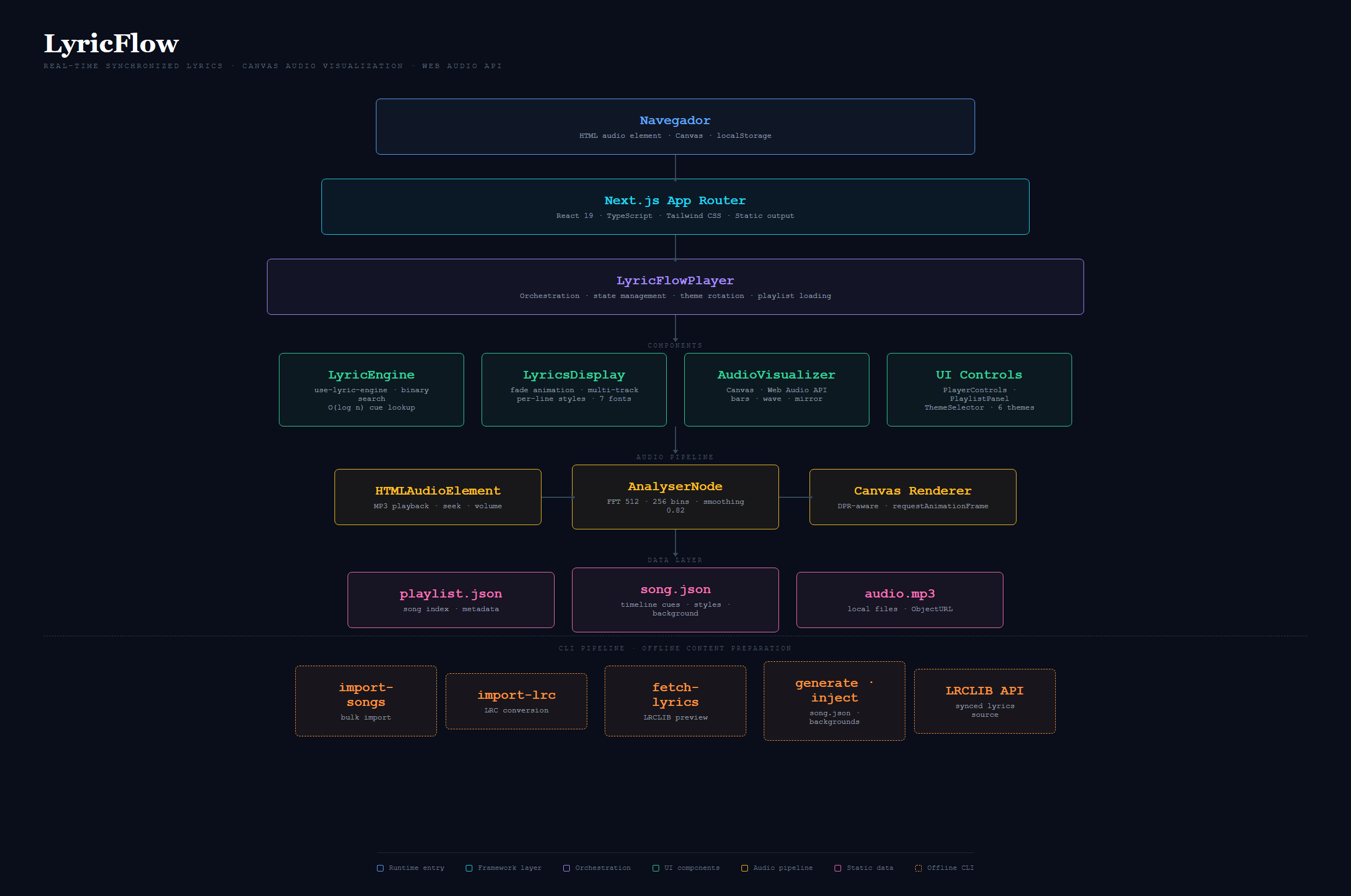
Architecture covering the Next.js application, React components, audio processing, Canvas visualization, and CLI pipeline.
Main Components
- LyricFlowPlayer — Main player and state orchestrator.
- LyricsDisplay — Renders synchronized lyrics.
- AudioVisualizer — Processes
AnalyserNodedata and renders Canvas. - PlaylistPanel — Handles playlist navigation and song selection.
- PlayerControls — Controls playback, seeking, volume, and navigation.
- ThemeSelector — Handles visual theme selection.
Main Hooks
- useLyricEngine — Manages player state and lyric synchronization.
- usePlayerTheme — Manages theme selection and persistence.
5. Technology Stack
Frontend
| Technology | Purpose |
|---|---|
| Next.js 16 / App Router | Framework and routing |
| React 19 | Components and state |
| TypeScript 5.7 | Static typing |
| Tailwind CSS 4 | Styling |
| shadcn/ui + Base UI | Interface components |
| Lucide React | Icons |
Audio and Visualization
| Technology | Purpose |
|---|---|
| Web Audio API | Audio analysis |
AnalyserNode | Audio data for visualization |
| Canvas 2D | Visualization rendering |
Content and Tooling
| Technology | Purpose |
|---|---|
| LRCLIB API | Synchronized lyrics retrieval |
| JSON | Metadata and timeline storage |
| LRC | Lyrics input format |
| pnpm | Dependency management |
| Vercel | Deployment |
6. Implemented Features
Playback and Lyrics
- MP3 playback.
- Playback and progress controls.
- Real-time lyric synchronization.
- Original lyrics and translation support.
- Automatic track advancement.
- Binary search over the cue timeline.
- Local file loading through
URL.createObjectURL.
Visualization
- Canvas-based audio visualizer.
- Bars, wave, and mirror modes.
- Web Audio API processing.
- Per-song image, video, or color backgrounds.
- Background video synchronized with playback.
- Configurable opacity.
Customization
-
6 predefined visual themes:
- Cosmic Night
- Solar Flare
- Deep Ocean
- Forest Noir
- Neon Tokyo
- Arctic Minimal
-
Automatic theme rotation.
-
Per-song custom styling.
-
Theme persistence through
localStorage. -
Custom theme import through JSON.
Content Management
- JSON-based playlist.
- Search by title, artist, and album.
- LRC file import.
- Bulk content processing through CLI.
- LRCLIB integration.
- Automatic background association during import.
7. Key Technical Decisions
Binary Search for Synchronization
The active lyric position is located using binary search over an ordered cue timeline.
Advantage: O(log n) lookup for the active cue.
Trade-off: requires an ordered timeline and careful handling of cue boundaries.
Web Audio API + Canvas
The visualizer uses native browser APIs instead of a dedicated visualization library.
Advantage: direct control over audio analysis and rendering.
Trade-off: visualization modes and performance optimization must be implemented manually.
Static Content Architecture
Songs and metadata are stored as version-controlled files.
Advantage: no database is required and deployment remains simple.
Trade-off: adding content requires modifying project files and redeploying.
CLI Pipeline Separation
Content preparation is separated from the playback application.
Advantage: content can be processed and validated before being consumed by the frontend.
Trade-off: content updates require running the pipeline and redeploying.
Custom JSON Format
LyricFlow uses a custom JSON format for metadata, timelines, styles, and backgrounds.
Advantage: flexible structure tailored to the player.
Trade-off: external formats such as LRC must be converted before direct use.
8. Security and Quality
LyricFlow does not provide a backend or user accounts. Music content included in the application is served as frontend assets.
Security
- No backend credentials.
- No user database.
- No authentication layer.
- Local files are handled through
URL.createObjectURL. - Selected local files are not uploaded to the server.
- LRCLIB is used during content preparation rather than as a runtime dependency for prepared songs.
- User preferences are stored locally through
localStorage.
The deployment uses Vercel Analytics, so the application should not be described as making no external network requests at all.
Current Quality
The project currently has technical debt:
- No unit tests.
- No integration tests.
- No E2E tests.
- No automated coverage.
ignoreBuildErrorsenabled for TypeScript.- No CI/CD pipeline.
The use of ignoreBuildErrors is particularly relevant because TypeScript errors can be present without blocking deployment. A production-oriented version should remove this configuration.
9. User Experience
LyricFlow uses a full-viewport interface focused on music playback.
Desktop
- Main playback area.
- Synchronized lyrics.
- Canvas visualizer.
- Lateral playlist panel.
- Bottom player controls.
Mobile
- Vertical layout.
- Adapted playback controls.
- Overlay playlist panel.
Interactions
- Real-time lyric highlighting.
- Theme switching without interrupting playback.
- Local file loading without page reload.
- Automatic track advancement.
- Keyboard shortcuts.
10. Visual Evidence
Main Player
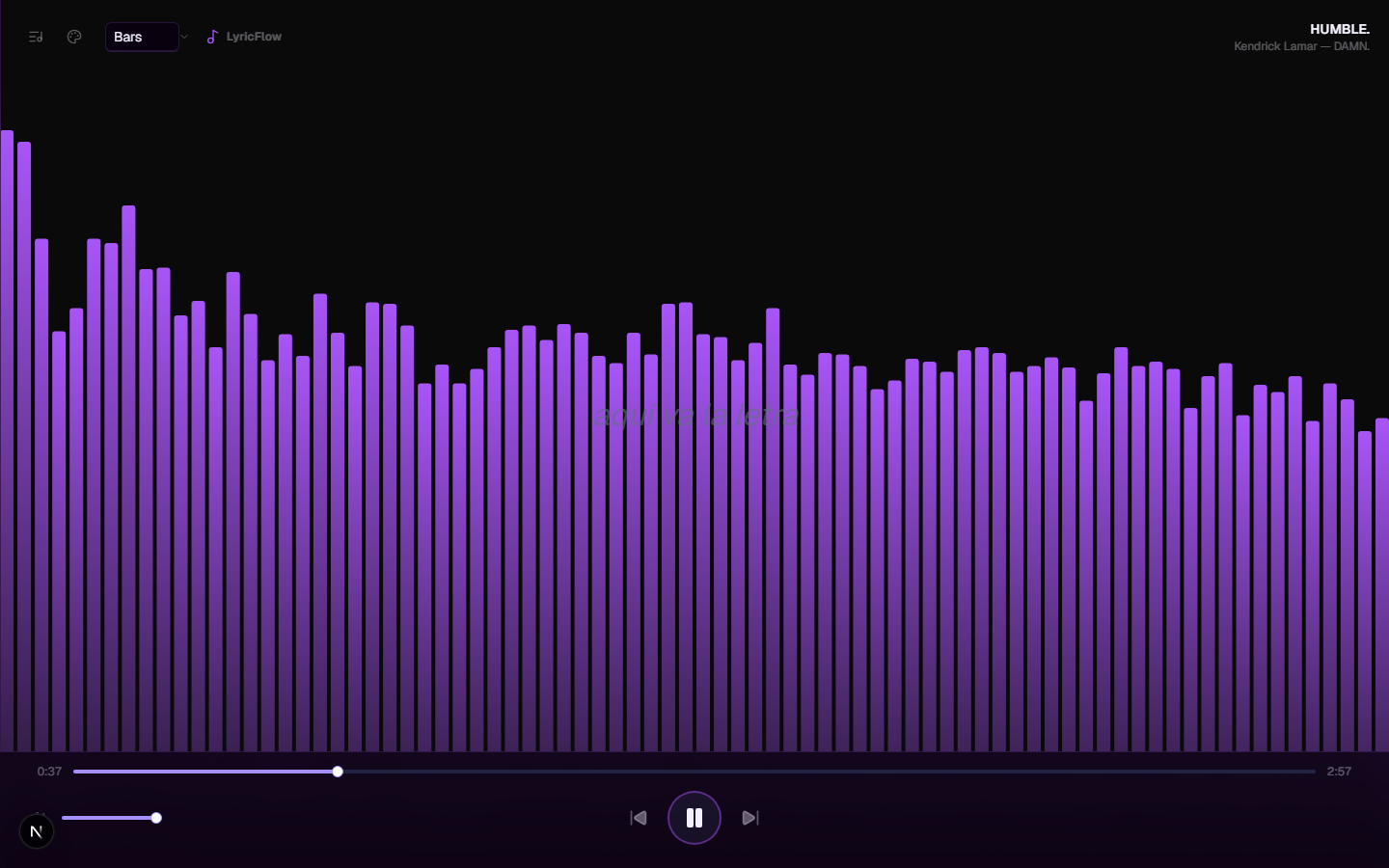
Main interface with playback, synchronized lyrics, and active audio visualization.
Visualizer — Bars
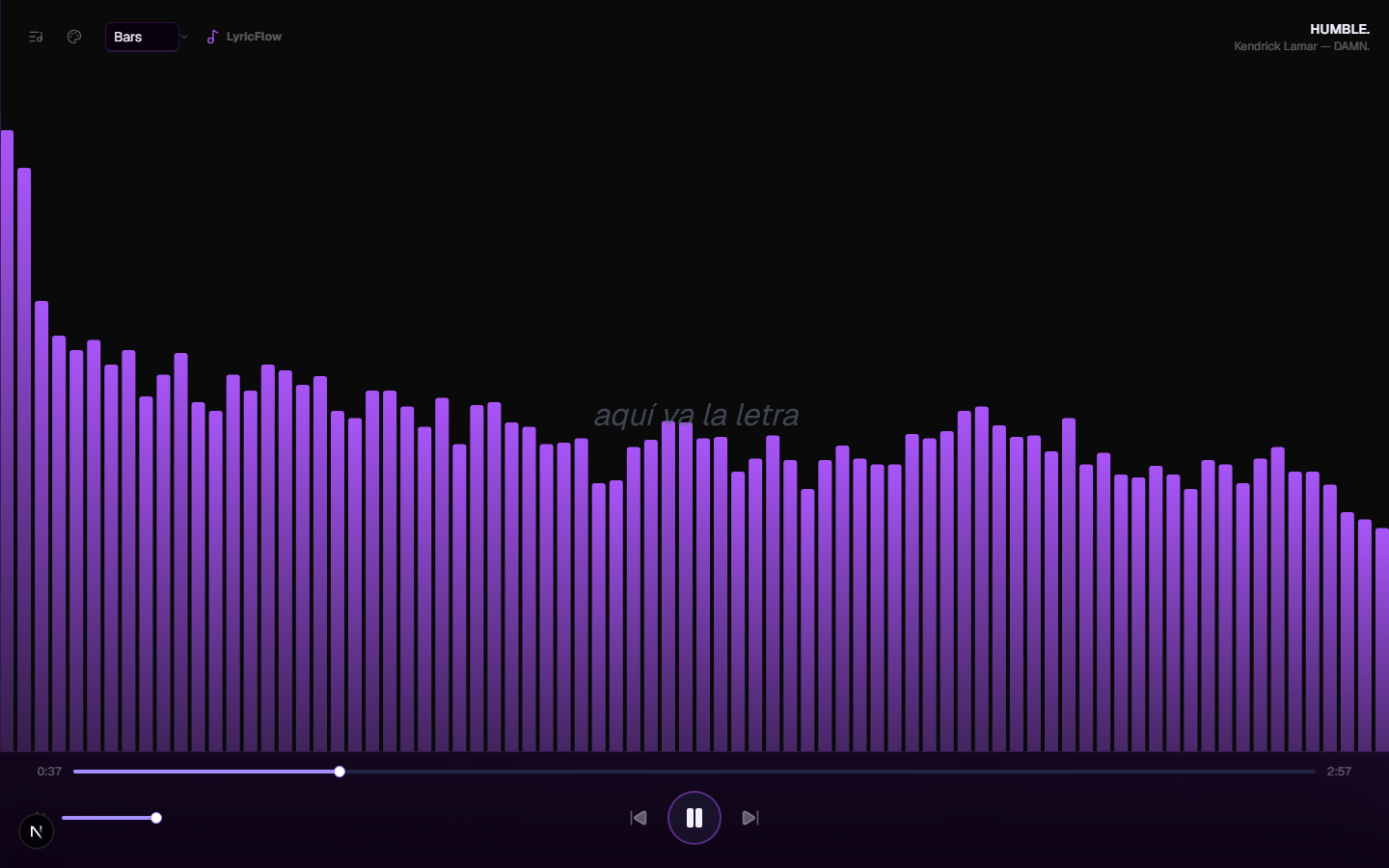
Frequency visualization using Canvas and Web Audio API.
Visualizer — Wave
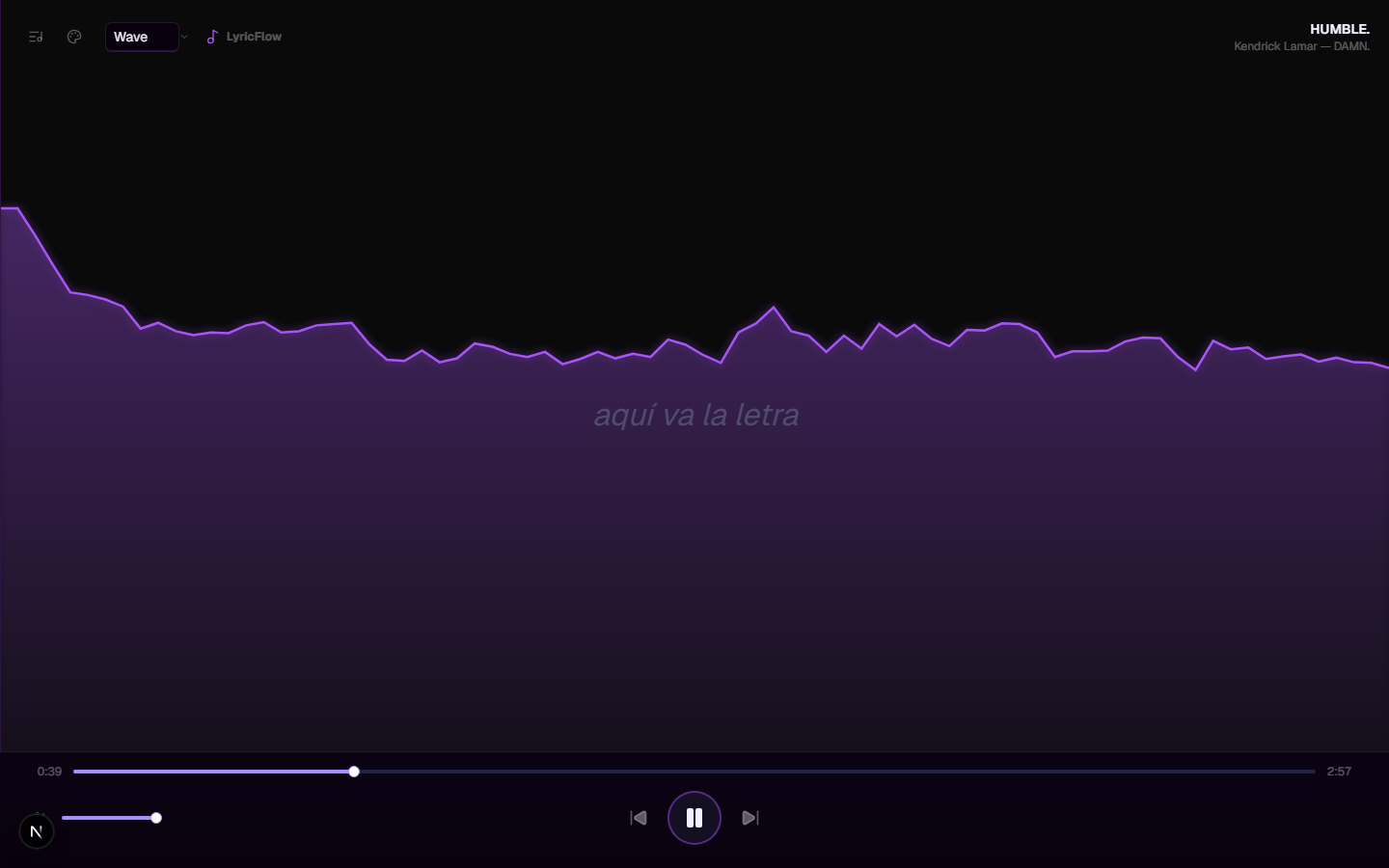
Audio visualization using a waveform representation.
Visualizer — Mirror
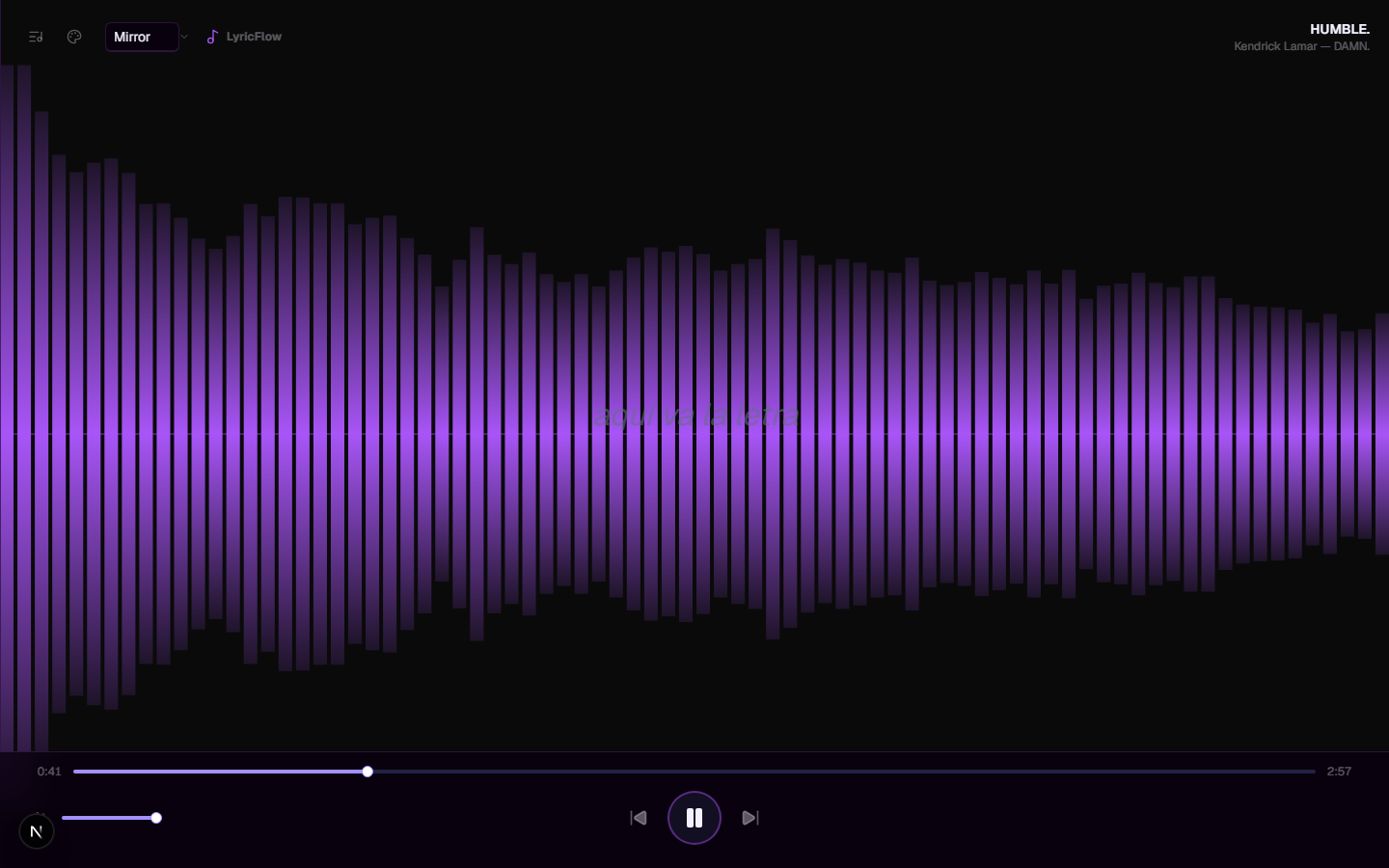
Bilateral audio spectrum visualization.
Themes
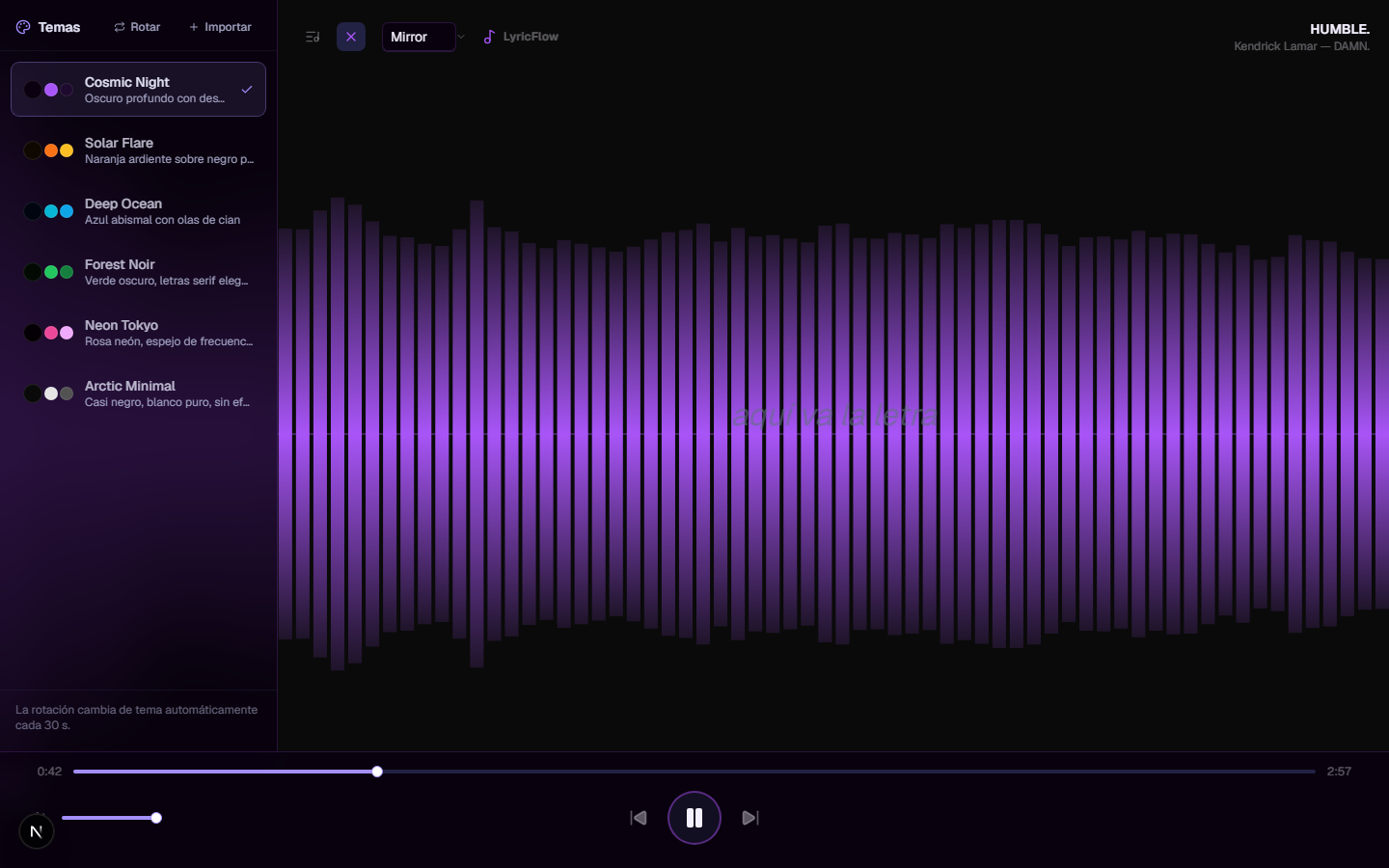
Selector showing the six available visual themes.
11. Current Status
Classification: Demo / Proof of Concept
LyricFlow is primarily intended to demonstrate multimedia frontend development and creative coding.
Current characteristics:
- No backend.
- No persistent song management system.
- Content is managed through project files.
- No automated test suite.
- TypeScript errors can be ignored during build.
- No CI/CD pipeline.
- Deployment is primarily demonstration-oriented.
Therefore, it should not be presented as a production-ready music streaming platform.
Main Limitations
- No backend or database.
- Content updates require file changes.
- No authentication.
- No collaborative features.
- No dedicated offline playback.
- Basic custom-theme import UX.
- Background videos are not directly audio-reactive.
- No native mobile application.
12. Future Evolution
The most relevant improvements would be:
- Remove
ignoreBuildErrorsand strengthen TypeScript validation. - Add unit and E2E tests for playback and synchronization.
- Configure CI/CD.
- Improve theme import through file uploads.
- Evaluate a backend architecture if accounts, persistent playlists, or remote content management are required.
- Improve the mobile experience.
These are potential technical improvements, not currently implemented features.
13. Demonstrated Skills and References
Demonstrated Skills
- Next.js and React frontend architecture.
- TypeScript development.
- Web Audio API.
- Canvas 2D.
- Real-time data synchronization.
- Binary search implementation.
- React hooks and state management.
- Visual theme system design.
- Browser-based local file handling.
- External API integration.
- CLI tooling.
- Responsive interface design.
- Creative coding.